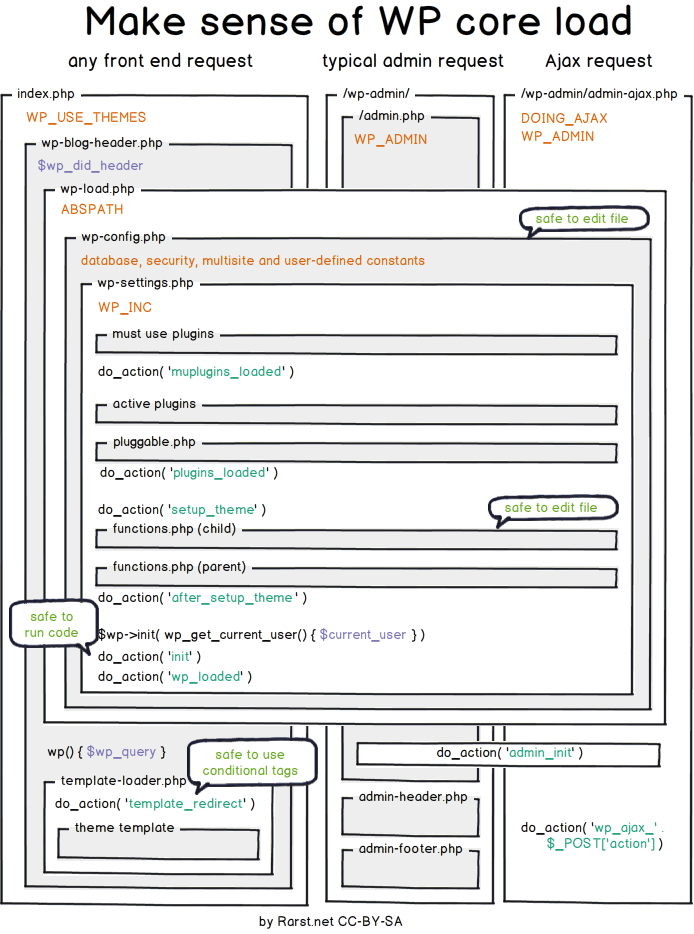
The path which is used for processing user requests.

To import database using terminal in Linux use the following snippet:
sudo /opt/lampp/bin/mysql -u root -p base_name_in_mysql < name_of_extracted_baseJust remember to rename the database and extracted .sql file.
There are situations when you need to escape from the regular Git workflow (committing all local changes, pulling all external changes). I’ll describe two such cases.
If, for some reason, you need to change file locally and don’t want to commit the file changes there is a git option –skip-worktree which you can use.
E.g. you may want to update .htaccess file to pull website files from the production server (if they’re missing locally), but you don’t want to commit that change to git since it might cause issues on other environments. You’d just add cd into the root of your project (where your .htaccess file is located) and run something like this:
git update-index –skip-worktree .htaccessOnce you’re ready to let Git track your local changes for that file again – you can restore Git management by using the following command:
git update-index –no-skip-worktree .htaccessWhen you want to keep a file as is and not pull the external changes (case with switching to other branches) you can use –assume-unchanged option.
E.g. the other developer is constantly updating his npm/gulp settings and you don’t want to repeat that process locally. You could run something like this:
git update-index –assume-unchanged gulpfile.jsOnce you’re ready to let those gulp changes flow into your local environment you can restore management to the git by using:
git update-index –no-assume-unchanged gulpfile.jsAuto-generated thumbnails
When you upload an image to your WordPress website, the platform creates 4 additional image sizes alongside your original image.
Those automatically generated sizes are:
These sizes can be changed inside the media settings page (/wp-admin/options-media.php), and you can also add custom sizes:
// Must be included if your theme does not have it already.
add_theme_support( ‘post-thumbnails’ );

// Define new customs image sizes.
add_action( ‘after_setup_theme’, ‘proultima_add_image_sizes’ );
function proultima_add_image_sizes() {
  add_image_size( ‘portfolio’, 300, 9999 ); // 300px wide unlimited height
  add_image_size( ‘xl’, 1200, 9999 ); // 1200px wide unlimited height
}

// Add human-readable names to the newly added image sizes.
add_filter( ‘image_size_names_choose’, ‘proultima_add_image_size_names’ );
function proultima_add_image_size_names( $sizes ) {
  return array_merge( $sizes, array(
    ‘portfolio’ => __( ‘Portfolio’ ),
    ‘xl’ => __( ‘Extra Large’ ),
  ) );
}WordPress detects big images (big in their dimensions) which you uploaded and scales them down if their dimensions are larger than the threshold (e.g. 2560px threshold).
The default width threshold can be overridden with max_srcset_image_width() function.
The default dimensions threshold is filterable with big_image_size_threshold filter, and you can even disable it with:
// completely disable image size threshold
add_filter( ‘big_image_size_threshold’, ‘__return_false’ );Based on the breakpoints of your theme you can choose to customize the sizes attribute of the adaptive image tag. You can do that for the content images and for thumbnail sizes too:
function proultima_content_image_sizes_attr($sizes, $size) {
    $width = $size[0];
    //Page without sidebar
    if (get_page_template_slug() === ‘template-full_width.php’) {
        if ($width > 910) {
            return ‘(max-width: 768px) 92vw, (max-width: 992px) 690px, (max-width: 1200px) 910px, 1110px’;
        }
        if ($width < 910 && $width > 690) {
            return ‘(max-width: 768px) 92vw, (max-width: 992px) 690px, 910px’;
        }
        return ‘(max-width: ‘ . $width . ‘px) 92vw, ‘ . $width . ‘px’;
    }
    //Page with sidebar
    if ($width > 597) {
        return ‘(max-width: 768px) 92vw, (max-width: 992px) 450px, (max-width: 1200px) 597px, 730px’;
    }
    if ($width < 597 && $width > 450) {
        return ‘(max-width: 768px) 92vw, (max-width: 992px) 450px, 597px’;
    }
    return ‘(max-width: ‘ . $width . ‘px) 92vw, ‘ . $width . ‘px’;
}
add_filter(‘wp_calculate_image_sizes’, ‘proultima_content_image_sizes_attr’, 10 , 2);
function proultima_post_thumbnail_sizes_attr($attr, $attachment, $size) {
//Calculate Image Sizes by type and breakpoint
//Header Images
if ($size === ‘header-thumb’) {
$attr[‘sizes’] = ‘(max-width: 768px) 92vw, (max-width: 992px) 450px, (max-width: 1200px) 597px, 730px’;
//Blog Thumbnails
} else if ($size === ‘blog-thumb’) {
$attr[‘sizes’] = ‘(max-width: 992px) 200px, (max-width: 1200px) 127px, 160px’;
}
return $attr;
}
add_filter(‘wp_get_attachment_image_attributes’, ‘proultima_post_thumbnail_sizes_attr’, 10 , 3);# Ignore configuration and hidden files.
.htaccess
wp-config.php
*.DS_Store
*Thumbs.db
.ftpquota
# Ignore project files.
/nbproject/
# Ignore paths that contain user-generated content.
/wp-content/uploads/
/wp-content/upgrade/
/wp-content/themes/twenty*
/wp-content/cache
/sitemap.*
*.sql
# Ignore log files
error_log
.log/
# Ignore debug plugins and settings.
/wp-content/plugins/fakerpress
/wp-content/plugins/show-current-template/If you’re getting the “Not enough free disk space” error while trying to update Ubuntu – that doesn’t mean your hard drive is full, but rather one of Linux’s partitions (namely /boot). It’s getting clogged every time you update your software (it stores unneeded Linux headers, apt cache, thumbnail and Chrome’s cache). The best (graphical) way to fix this issue is to install “Ubuntu Cleaner” app. To do this open the terminal and run the following commands:
sudo apt update -y && sudo apt upgrade -y && sudo apt install git software-properties-common -y
sudo add-apt-repository ppa:gerardpuig/ppa
sudo apt update -y
sudo apt install ubuntu-cleaner
After that search the dash for “Ubuntu tweak“.
Once open, go to “Janitor” tab, select “Apps“, “Personal” and “System” check boxes and click “clean” button.
That’s it! Now run “Software Updater” again.
Note: you might have to repeat cleaning from time to time.
You can also run the following commands:
#!/bin/bash # Removes old revisions of snaps # CLOSE ALL SNAPS BEFORE RUNNING THIS set -eu snap list --all | awk '/disabled/{print $1, $3}' | while read snapname revision; do snap remove "$snapname" --revision="$revision" doneTo force Drupal or WordPress sites to use secure https:// instead of http:// version of your site just add the following to the .htaccess file:
Note: replace “www.example” with the appropriate site domain. Also, this rewrite rule should be the first rule in your .htaccess file, since otherwise in some situations rewrites might not ever get to this rule.
# Force https access.
RewriteEngine On
RewriteCond %{SERVER_PORT} 80
RewriteRule ^(.*)$ https://www.example.com/$1 [R,L]This is the cool article which explains how to troubleshoot: https://css-tricks.com/findingfixing-unintended-body-overflow/
Or you may use the following code and add it to the Console (Developer Tools).
var all = document.getElementsByTagName(“*”), i = 0, rect, docWidth = document.documentElement.offsetWidth;
for (; i < all.length; i++) {
    rect = all[i].getBoundingClientRect();
    if (rect.right > docWidth || rect.left < 0){
        console.log(all[i]);
    }
}If you need to check IP address, DNS settings and records, or your hosting neighbors here are few of the best free online network tools out there.
UnPHP: A free online service to decode obfuscated PHP code. A good chance to solve your issue.
PHP Decoder: The same as above and still useful (if UnPHP was not successful).
Eval base64_decode: also useful for PHP code
Script Asylum: A good tool for escaping/encoding text, HTML or JavaScript.
Base64: HEX encode/decode
CSS resources are render-blocking. Here are the steps for optimizing your CSS:
<link rel="stylesheet" href="style.css">
<link rel="stylesheet" href="mobile.css" media="(max-width: 768px)">
<link rel="stylesheet" href="print.css" media="print">
JavaScript resources are parser-blocking so consider doing this to speed-up your JavaScript on your website:
<head>
  ...
  <script src="analytics.js" async></script>
  ...
</head>
defer attribute, in the same way that it can take an async attribute. The difference is that with defer, the script waits to execute until after the document has been parsed, whereas async lets the script run in the background while the document is being parsed.)For page to be downloaded and processed faster we need to:
Page rendering path: https://developers.google.com/web/fundamentals/performance/critical-rendering-path
WHY SO? If the files do not depend on one another, then you should place your blocking scripts above your blocking styles—there’s no point delaying the JavaScript execution with CSS upon which the JavaScript doesn’t actually depend.
Broadly speaking, this is why CSS is so key to performance:
async and defer attributes;HTTP/2 has made obsolete:
While open Google DevConsole click CTRL+SHIFT+P and search for:
Further optimize Bootstrap4 resources (remove CSS and JS which is not needed)
Use imagemin webp package to convert all images to webp format. https://web.dev/serve-images-webp/
for file in images/*; do cwebp "$file" -o "${file%.*}.webp"; done
Use critical tool to detect the critical assets which should be preloaded. https://github.com/addyosmani/critical/blob/master/README.md
Use https://gtmetrix.com/ plugin to test web page speed.
Create our plugin which would work as: https://perfmatters.io/features/
For javaScript issues you need to open new tab in chrome ( chrome://inspect ) and you’ll get javascript console logs for all open windows.
Or you can install: https://github.com/RemoteDebug/remotedebug-ios-webkit-adapter.
Third party providers can be divided into these categories:
The three primary usage patterns of third-party resources:
Weather your web server is apache or nginx you should: